
CCTV in your café: signs, footage requests and watching staff
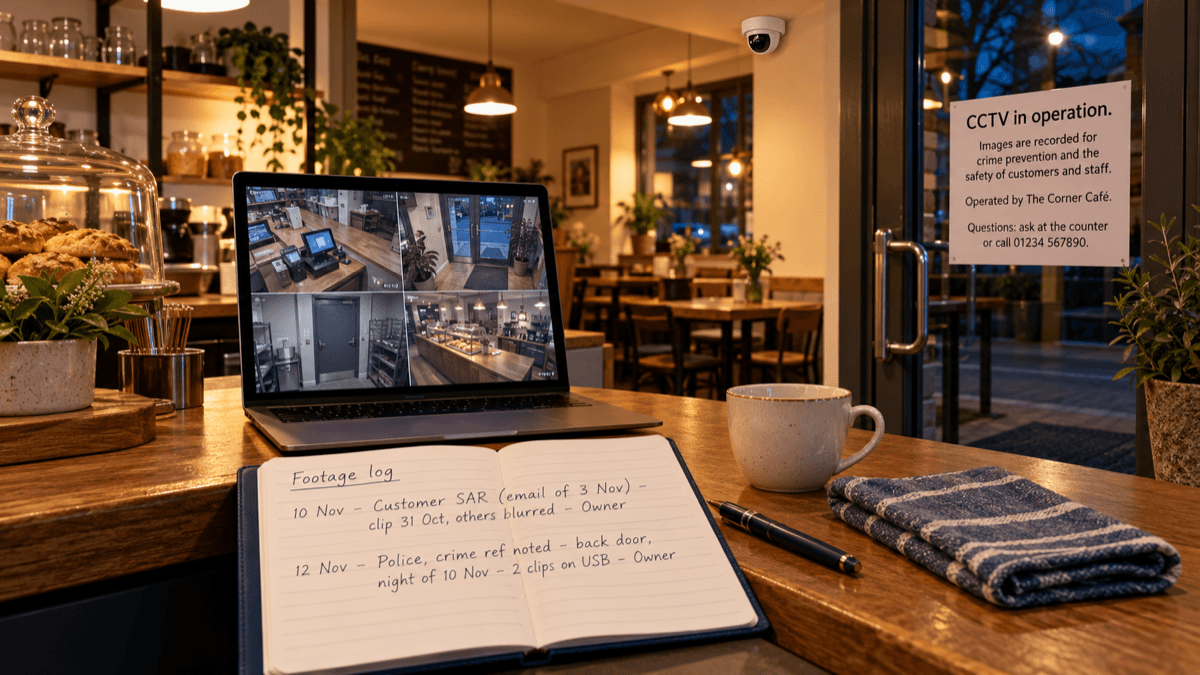
Most café CCTV goes in on a single afternoon. The installer fits a dome camera over the till and another above the back door, shows someone the app, sticks a sticker on the glass and leaves. Nobody thinks about it again until something goes missing.
The recorder, meanwhile, writes over itself on whatever cycle the installer left it on. The law gives you a month to answer someone who asks for footage of themselves. If nobody on shift can find and lock the right footage in time, the month is no help at all.
Cameras that capture identifiable people are processing personal data under UK GDPR. That means a reason, signs, a retention period, someone who can find and hand over footage when asked, and care before you use it on your own team.
The ICO (since 30 September 2026 officially the Information Commission, SI 2026/1015) says its CCTV guidance and monitoring workers guidance are both "under review and may be subject to change", so check the live pages.
The basics: fee, reason, paperwork
Pay the data protection fee
The ICO's fee FAQs are blunt: "Any company using CCTV for crime prevention purposes is required to pay an annual data protection fee to the ICO". Sole traders pay too, not just companies.
As at October 2026, tier 1 (turnover up to £632,000 or no more than 10 staff) is £52, or £47 by direct debit. Tier 2 is £78, or £73 by direct debit. Not paying risks a penalty of up to £4,000. It sits alongside the other registrations in the café licences and registrations checklist.
Write down why you have cameras
The ICO's guidance for small organisations says: "Set out why you need CCTV and how you plan to minimise the impact on people's privacy." Your lawful basis, says its main guidance, is likely to be "legitimate interests": a genuine problem such as break-ins or theft, with cameras as a proportionate answer.
That fits on one page: who's responsible, why you have cameras, where each one points, how long footage is kept, who can view it and on which devices, and how you handle requests. The ICO's checklist for limited CCTV systems, aimed at small premises, makes a good template. Set a review date.
When you need a DPIA
A data protection impact assessment (DPIA) is needed where processing is likely to be high risk, and the ICO expects one for most cameras. Its accountability guidance says a DPIA "is a legal requirement and applies in most cases relating to video surveillance", and that if you decide not to do one, "you need to document your reasons".
So a single front door camera you judge low risk still needs a short note saying why. If footage may be used to check on your team, you are monitoring workers, and the ICO's guidance on methods of monitoring workers says that for video monitoring you "must" complete one. For a small café that's a couple of pages, not a consultancy project.
Signs: what they say and where they go
There's no set wording in law. The ICO's ask: "Your signs should explain why you're using CCTV, and who to contact to raise any queries." Signs "do not need to say who is operating the system if this is obvious", but "publishing information on a website, by itself, is not enough".
A bare camera sticker doesn't do that. For an illustrative café:
CCTV in operation. Images are recorded for crime prevention and the safety of customers and staff. Operated by The Corner Café. Questions: ask at the counter or call 01234 567890.
Position matters too. The ICO suggests signs "before the entrance to the system's field of vision", so people see the sign before the camera sees them: on the door at eye level, by the counter, and at the back door if a camera covers it.
Where cameras go, and where they don't
Check what each camera actually sees, including through the windows.
- Never toilets or changing areas. The ICO says CCTV "shouldn't be running in areas considered private", naming both.
- Not the staff room, as a rule. In the ICO's example, video in a staff rest area "would be difficult to justify".
- Not the street or the neighbours. One ICO example is a café whose new entrance camera "also captures footage of a nearby flat, and can see into the property". The owner narrowed the view.
Switch the microphone off
Many cameras record sound out of the box. The ICO's small-business page says they can, "but this doesn't mean you should." Its main guidance says you "should not normally use surveillance systems to directly record conversations between members of the public", and audio should be off by default.
A café is full of private conversations: customers at tables, staff at the pass, someone phoning their GP. Turn audio off on every camera. The ICO expects sound recording only "in exceptional circumstances", and even then you would need to make it clear to people that sound is being recorded, over and above a standard camera sign.
How long to keep footage
There's no legal number of days: "You mustn't keep the CCTV footage for longer than you need it." The ICO warns against keeping footage for six months "merely because the manufacturer's settings" allow it, and in its small-business example a bar owner settles on two weeks.
My own view, not the ICO's: too short is a risk too, because a theft spotted at the monthly stocktake, or a request that arrives ten days later, finds nothing. Pick a period that covers how long it takes you to notice a problem, set the recorder to it, and write it down.
Two exceptions. If the police ask you to preserve footage, keep it. And once a subject access request arrives, lock or export the relevant footage straight away: deleting information to stop it being disclosed after a request is an offence under section 173 of the Data Protection Act 2018.
Who can see it
The phone app counts, and so does a monitor facing the counter: the ICO says "viewing data in real time on a screen also qualifies as processing."
- Audit the logins. List everyone with the app or a login (ex-managers are the classic gap), remove leavers on their last day, and change any default password.
- Limit exporting to whoever handles requests, and install security updates.
- Tell staff misuse is serious. Sharing a clip without your say-so can be an offence under section 170 of the Data Protection Act 2018, as the ICO's governance guidance points out.
If a camera company or cloud service stores footage for you, it's your processor, and the ICO expects "written contracts in place". Check yours.
When someone asks for footage of themselves
Anyone on camera can ask for a copy: a customer, a delivery driver, one of your team. That's a subject access request (SAR), and it can be made verbally to whoever is on shift. It's why the complaints and refunds escalation list sends any request for CCTV to you or whoever is in charge, not the barista.
From the ICO's right of access guidance:
- One month from receipt. For a fixed number of days, the ICO suggests 28.
- Up to two further months only if the request is complex or you've had a number of requests from the same person, and you must say why within the first month. A request is "not automatically complex because it involves a large amount of information".
- Free, almost always: "In most cases, you cannot charge a fee to comply with a SAR."
- Details to find it. Requesters must give details "such as a photo, date or time", says the ICO's CCTV guidance.
The Data (Use and Access) Act 2025 added two things that help:
- A reasonable search. You only owe what you can find through "a reasonable and proportionate search" (section 78, in force from Royal Assent on 19 June 2025 and treated as applying from 1 January 2024).
- Stop the clock. For requests received from 5 February 2026 (section 76, commenced by SI 2026/82), the clock stops while you wait for information you reasonably need to identify what's being asked for. It "pauses on the day you request clarification and resumes on the day after you receive it". Don't ask "on a blanket basis", the ICO warns.
An illustrative request, start to finish
A hypothetical café, its recorder set to overwrite after two weeks, gets a request by email:
| Date | What happens |
|---|---|
| Tue 3 Nov 2026 | Email: "all the CCTV of me from last week". Owner logs it and locks the footage for Mon 26 Oct to Sun 1 Nov. |
| Wed 4 Nov | Owner asks which day, roughly what time, and for a photo or description. The clock stops. |
| Mon 9 Nov | Reply: Saturday 31 October, about 11am, blue coat. The clock restarts the next day. |
| Wed 9 Dec | Deadline: the original Thu 3 Dec, plus the six paused days (4 to 9 November inclusive) |
Without the lock, the earliest days of that week would have started overwriting on Monday 9 November (26 October plus 14 days), the day the reply arrived. Saturday's footage was safe until 14 November, but had the visit been on the Monday, it would have been gone. One visit isn't complex, so there's no extension.
Other people in the frame
You owe "a copy of the information about the requester rather than a complete version of footage", says the ICO's governance guidance. Other customers and your staff are third parties: get their consent where reasonable, or blur them out (check now whether your recorder can). If you hold something back, you "must still provide as much of the requested information as you can" (ICO guidance on other people in a SAR). Send the clip by secure link, or offer a viewing if the requester agrees.
Complaints have their own clock. Since 19 June 2026 you must make it easy for people to complain to you about how you use their data, and acknowledge a complaint within 30 days (section 164A of the Data Protection Act 2018). An ignored complaint tends to become a complaint to the ICO.
Police, insurers and everyone else
When the police ask for footage, the relevant exemption is Schedule 2, Part 1, paragraph 2 of the Data Protection Act 2018. It sets aside some normal UK GDPR rules where applying them "would be likely to prejudice" the prevention, investigation or detection of crime, or catching and prosecuting offenders.
It doesn't oblige you to hand anything over: unless a court order applies, the ICO says disclosure "is not a legal requirement and is often voluntary", though for a system set up to prevent crime it's usually appropriate. Get the request in writing, with the officer's name, crime reference and what they need, and give the specific clip, not the hard drive.
Insurers, solicitors and the neighbour whose car was scraped outside aren't automatically covered by that exemption. Get it in writing, check it fits your reason for having cameras and is fair to the people on screen, and send only what's needed. If the person asking is the one on camera, it's a SAR.
Keep a footage log
The ICO's governance checklist expects a record of each disclosure: "the date of the disclosure", who received it and "why they required it". Log requests too. Illustrative entries for a hypothetical café:
| Date given | Who asked | What | Why | What we gave | Authorised by |
|---|---|---|---|---|---|
| 10 Nov | Customer, email of 3 Nov | Own footage, w/c 26 Oct | Subject access request | Clip from 31 Oct, others blurred, secure link | Owner |
| 12 Nov | Local police, crime ref noted | Back door camera, night of 10 Nov | Break-in investigation | Two clips on USB | Owner |
Your staff and the cameras
The ICO's monitoring workers guidance is clear: "you must tell workers about monitoring in a way that is accessible and easy to understand." Tell your team where the cameras are, why, how long footage is kept, and whether it could be used in an investigation. The CCTV notice belongs in the same pack as the written statement of employment particulars every new starter gets.
Skip that and the footage may be no use to you later: where cameras went up for security, the ICO's small-business page warns, "it won't usually be fair on your staff to use it to monitor or discipline them without warning."
Two lines not to cross:
- Continuous watching. "You are only likely to be justified in using continuous video or audio monitoring of workers in rare circumstances," says the ICO's guidance on methods of monitoring workers. Checking the live feed from the sofa to see who's leaning on the counter is not the reason on your sign.
- Hidden cameras. "It is unlikely that you will be able to justify covert monitoring in most usual circumstances," says the ICO's main monitoring workers page. It allows for "exceptional circumstances", such as suspected criminal activity or gross misconduct, with senior management sign-off, a DPIA, the shortest possible timeframe, and not in areas where staff would expect privacy, such as toilets or changing rooms. Take advice first.
Using footage in a disciplinary
The Acas Code of Practice says to set out the case in writing, and "It would normally be appropriate to provide copies of any written evidence". By the same logic, let the employee see the relevant footage: the ICO says workers should be able to "see and, if necessary, explain or challenge the results of any monitoring". Then follow the Code: a meeting, the right to be accompanied, an appeal. A fair disciplinary process for a small café walks through each step.
The till camera and cash variances
The till camera is the most common in cafés, and the most tempting to misuse. As I wrote in daily cashing up and till variance, the overwhelming majority of till variance is training or process, not theft. Footage is the last step: count the drawer, check the cash-up log, look at refunds and no-sales, fix the process, and only then look at a specific time on a specific day.
The same goes for stock: a back door camera is one part of tightening the system when stock goes missing, alongside daily reconciliation and comp authorisation. For day-to-day standards, a closing checklist that gates clock-out does more than any camera.
If you come to suspect someone, take HR or legal advice first. The ICO's own example treats till footage gathered on an employee suspected of stealing as criminal offence data, with extra rules under Article 10 of UK GDPR.
This week
- Check the ICO fee is paid (£52, or £47 by direct debit, for most small cafés) and note the renewal date.
- Write one page: why, where the cameras point, retention, who can view and who handles requests. Add a short DPIA (expected for most cameras, and required if you are monitoring staff), or write down why you don't need one.
- Fix the signs: purpose and a contact, on the door before anyone is on camera.
- Turn audio off, then re-aim anything that sees the street, a neighbour or the staff room.
- Audit the logins: who has the app, who has left, and whether the default password is still set.
- Test a request: find, export and blur ten minutes of footage. Time it.
- Start a footage log and put the CCTV notice in the new-starter pack.
The camera only has to see what happens. You have to be able to find it, hand it over and explain why you kept it.
Ed O'Brien has run Hunters Cake Company for 17 years across cafés in Witney, Burford, and a bakery in Carterton, Oxfordshire. He's building Brikly - modular tools that give independent café owners the same data the big chains have, without the big chain price tag.